Configuration
Open settings from the tray menu (Right-click → Settings).
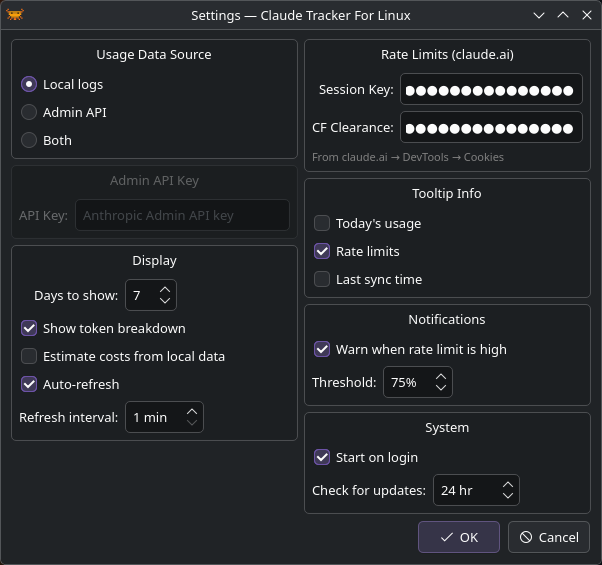
Usage Data Source
Choose where CTFL reads token usage data. See Data Sources for details.
| Option | Description |
|---|---|
| Local logs | Reads from ~/.claude/projects/ — no API key needed |
| Admin API | Fetches from the Anthropic Admin API |
| Both | Merges both sources |
Display
| Setting | Default | Description |
|---|---|---|
| Days to show | 7 | Number of days shown in the usage popup (1–90) |
| Show token breakdown | On | Show input/output token split in bar charts |
| Estimate costs from local data | Off | Calculate costs from local logs using public pricing |
| Auto-refresh | On | Periodically refresh usage data |
| Refresh interval | 1 min | How often to refresh (1–60 minutes) |
Rate Limits
To see plan utilization from claude.ai, you can provide cookies from your browser:
| Field | Description |
|---|---|
| Session Key | Your sk-ant-sid... cookie from claude.ai |
| CF Clearance | The cf_clearance cookie value |
Note
If you use Claude Code, CTFL automatically reads your OAuth token from the .credentials.json file in the active profile. The session key fields are an alternative for users who don't use Claude Code.
Profile
If you manage multiple Claude accounts through CCS, CTFL shows a Profile submenu under the tray icon (right-click) listing every instance it finds under ~/.ccs/instances/*/ plus the legacy ~/.claude/ directory.
| Option | Behavior |
|---|---|
| Auto-detect | Follows the profile currently in use. CTFL reads CLAUDE_CONFIG_DIR from any running claude process and falls back to the instance with the most recent activity when nothing is running. |
Named instance (e.g. personal, work) |
Pins CTFL to that profile. Auto-detection is disabled until you switch back to Auto. |
The tooltip header shows the active profile when more than one is discovered, marking auto-detection with (auto) so you always know which profile's data you're looking at.
The submenu only appears when CTFL finds more than one instance. If you use a single ~/.claude/ directory, nothing changes.
Tooltip Info
Choose what appears in the tray icon tooltip on hover:
- Today's usage — total tokens used today
- Rate limits — current session/weekly utilization
- Last sync time — when data was last refreshed
Notifications
| Setting | Default | Description |
|---|---|---|
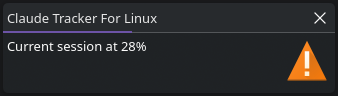
| Warn when rate limit is high | On | Show a desktop notification when utilization exceeds the threshold |
| Threshold | 75% | The utilization percentage that triggers a warning |
System
| Setting | Default | Description |
|---|---|---|
| Start on login | Off | Create an autostart entry for your desktop environment |
| Check for updates | 24 hr | How often to check GitHub for new releases (0 = disabled, max 168 hr) |